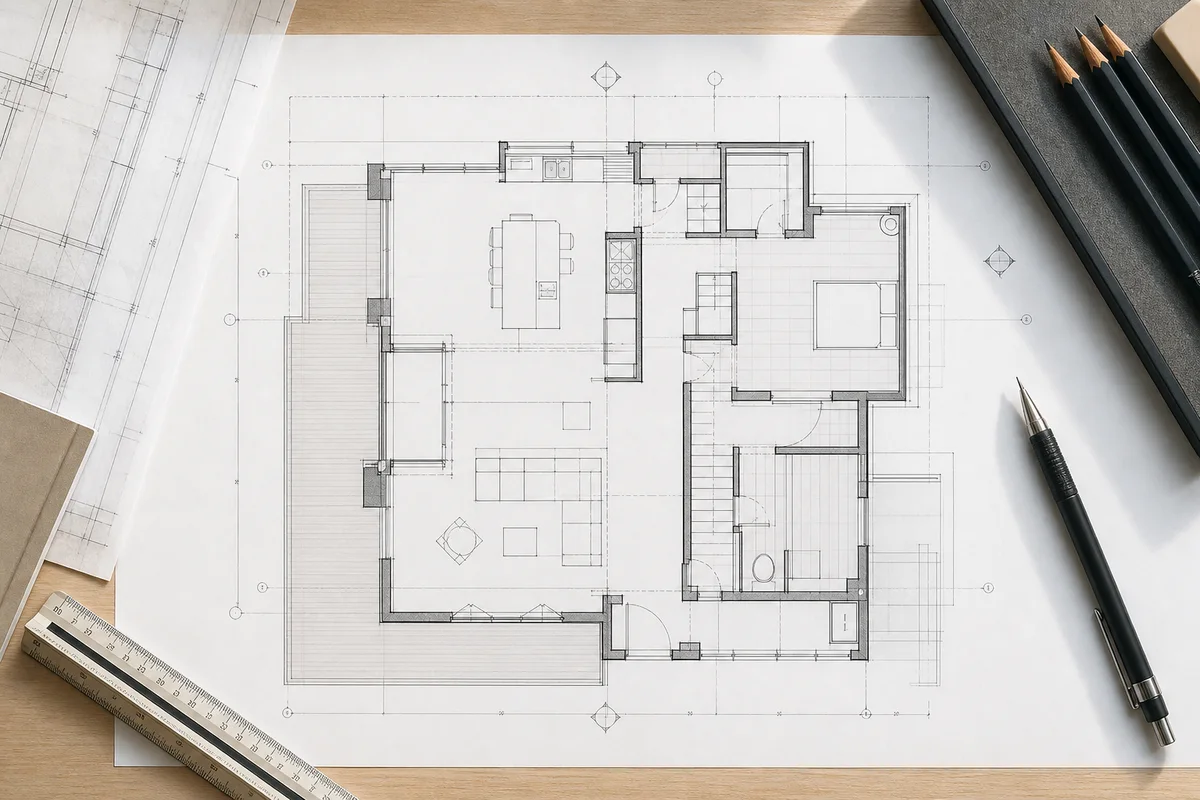
Floor plan symbols are a visual language. They let a drawing explain walls, openings, fixtures, equipment, movement, and references without filling the page with paragraphs. Once you recognize the common marks, you can read a plan faster, compare layouts more confidently, and ask better questions before detailed design begins.
There is no single symbol library used identically on every project. Conventions vary by country, office, drawing type, and software. A real-estate plan may show only walls, doors, windows, room names, and dimensions. A coordinated design set may add electrical outlets, plumbing fixtures, structural grids, section marks, finish tags, and revision symbols. Always read the legend and abbreviations printed on the drawing before relying on a general guide.
This article explains the categories you are most likely to encounter and, more importantly, what each symbol tells you about how the space works.
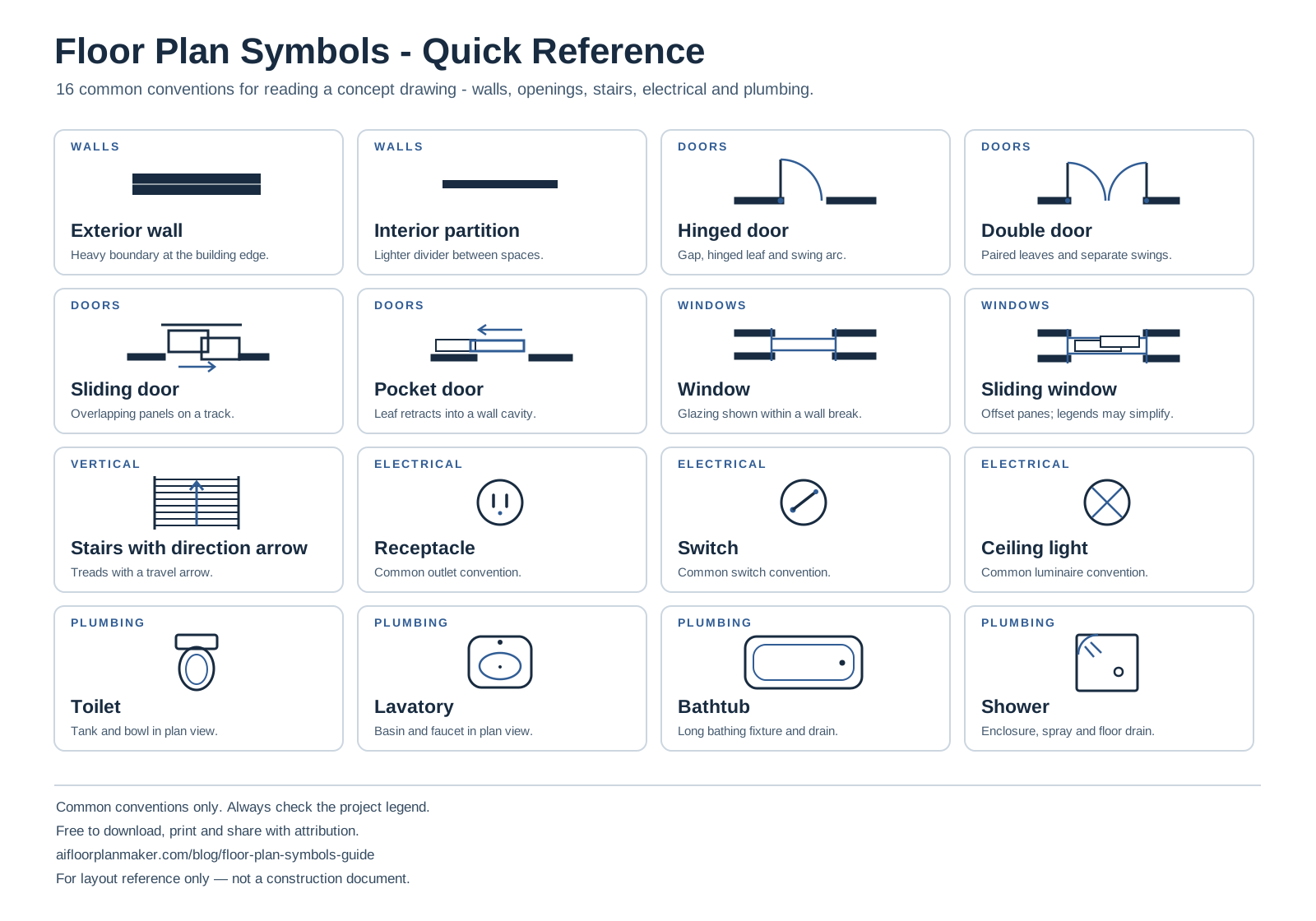
Download the Floor Plan Symbols Cheat Sheet
Keep these 16 common symbols beside a drawing as a quick reference for walls, doors, windows, stairs, electrical marks, and plumbing fixtures.
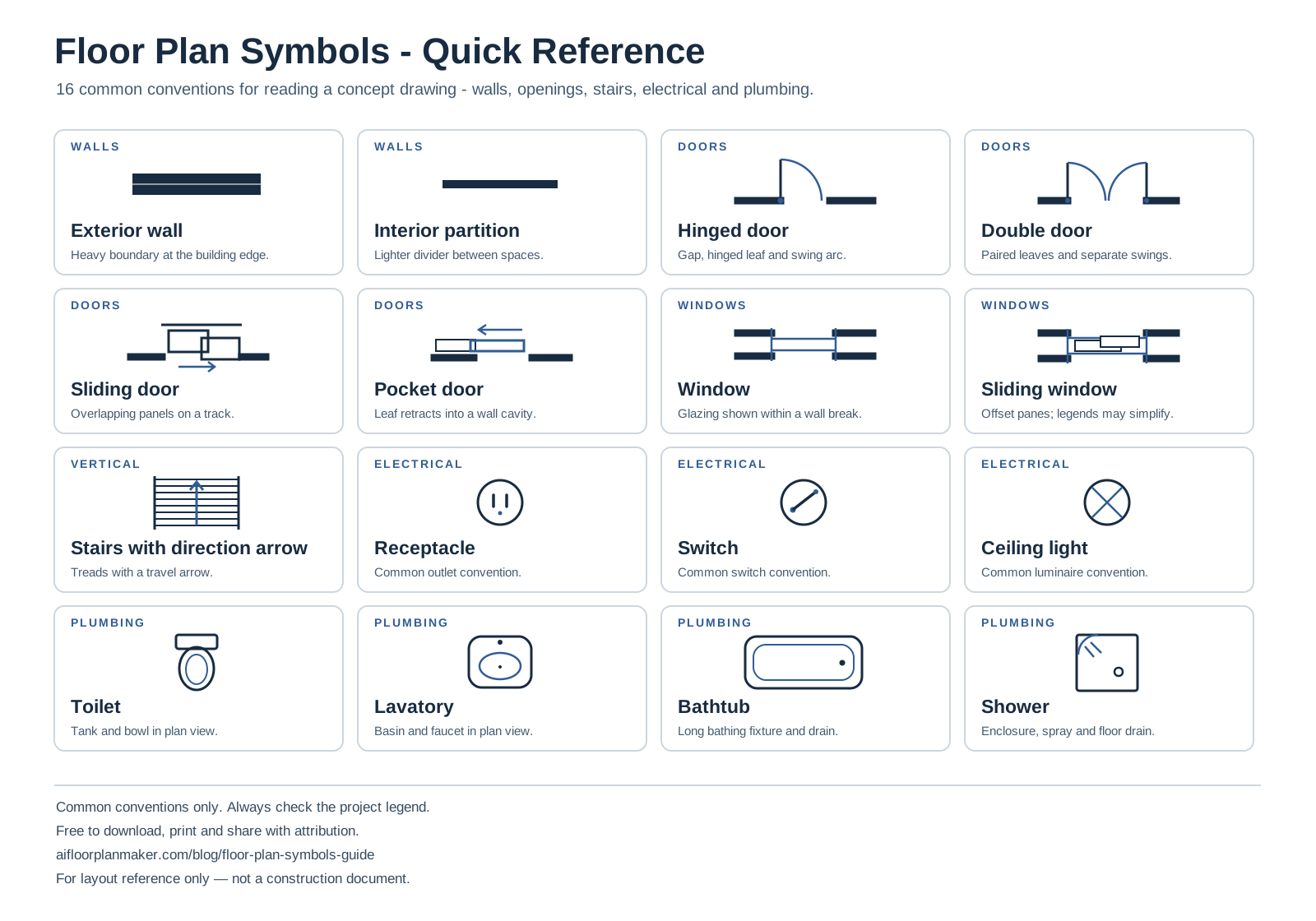
Free to download, print, and share with attribution to AI Floor Plan Maker. Common conventions only: always check the project legend. For layout reference only, not a construction document.
How to Read Line Weight and Line Type
Before learning individual icons, study the lines. Heavy, continuous lines usually represent elements cut by the plan view, especially walls and structural components. Medium lines often describe openings, built-ins, and objects below the cutting plane. Light lines may show furniture, surface changes, dimensions, or elements beyond the main focus.
A dashed line often means the element is above, below, hidden, or proposed for removal, but the exact meaning depends on the legend. For example, overhead cabinets, roof edges, beams, and soffits can all appear dashed. A centerline commonly uses a repeating long-short pattern. A property or setback line may use another pattern entirely.
Line hierarchy prevents a plan from looking flat. When every object has the same weight, a chair can compete visually with a wall. Read the darkest continuous shapes first, then openings, then fixtures and notes. That order usually reveals the building organization before the smaller details.
Structural and Architectural Symbols
Exterior and interior walls
Walls are the backbone of a floor plan. Exterior walls are often the thickest paired lines because they define the building envelope. Interior partitions are generally thinner. Some plans use fills or hatching to distinguish concrete, masonry, wood framing, insulation, or existing construction.
Do not assume that a marketing plan shows exact wall thickness. Simplified drawings favor readability. On a technical plan, check the wall-type tag and related detail rather than measuring the line on screen. A tag such as W1 or P2 usually points to a schedule that defines the complete assembly.
Columns, posts, and structural grids
Columns may appear as filled circles, squares, rectangles, or outlined shapes. A structural grid uses numbered and lettered bubbles connected by thin centerlines. Designers use the grid to coordinate column positions and locate elements across multiple sheets.
Columns affect usable area and circulation even when they look small. In an open office, restaurant, or retail layout, a column can interrupt a seating row or aisle. In a residential plan, a post may control how wide an opening can become. Treat structural symbols as fixed until a qualified structural review says otherwise.
Beams, soffits, and elements above
Beams or overhead elements may be shown with dashed parallel lines and a note. Because the horizontal plan cut is usually below them, they are not drawn like walls. The mark matters when headroom, lighting, cabinets, or ceiling layouts are being coordinated.
Changes in level
Steps, ramps, floor transitions, and level markers communicate vertical change. A spot elevation can be a number beside a target or crosshair. A ramp typically includes an arrow and slope note. Even a small level difference can affect an accessible route, so confirm its direction and amount rather than treating it as decoration.
Door Symbols
A hinged door is commonly shown as a gap in a wall, a thin door leaf, and a curved swing arc. The arc shows both the hinge side and direction of travel. This is one of the most useful symbols on a plan because it exposes conflicts with fixtures, cabinets, other doors, and walking routes.
A pair of leaves and arcs indicates double doors. A sliding door is often shown as panels overlapping or moving parallel to the wall. A pocket door slides into a wall cavity and may be drawn with the leaf inside the partition. A folding door can use connected angled panels. A revolving door uses a circle divided by several leaves.
Door tags usually combine a number or letter with a shape. The tag points to a door schedule listing width, height, material, fire rating, hardware, and other project information. The graphic alone does not carry all of those properties.
When comparing layouts, check four things: opening width, swing direction, clear approach, and the wall space consumed by the open leaf. A room may have enough area but still fail to work because the door blocks the only place for a cabinet or causes two circulation paths to collide.
Window and Glazing Symbols
Windows are commonly shown as breaks in walls with one or more thin lines across the opening. The number of lines does not reliably tell you how many glass panes the real window has. Window tags point to a schedule with type, rough opening, operation, glazing, and sill information.
Sliding, casement, awning, fixed, bay, and corner windows may use different plan symbols, but small-scale drawings often simplify them. Storefront glazing may appear as a thin continuous line inside a framed wall opening. Interior glass partitions can look similar to windows, so read nearby tags.
Window position affects natural light, privacy, ventilation, and usable wall length. A plan view rarely explains the complete vertical relationship. Check elevations or notes for sill height, head height, and window operation where those details matter.
Stair, Ramp, and Elevator Symbols
Stairs are shown as parallel tread lines with an arrow indicating the direction of travel. A break line may hide the portion above the plan cut. Labels such as UP or DN clarify which way the stair continues. Landings, handrails, and the opening through the floor should also be visible in a developed plan.
Compare stairs across floors. The upper landing may occupy space that looks open on the lower plan. The arrow does not prove that headroom, rise, run, or guard conditions are correct; those require dimensions and vertical drawings.
Elevators usually appear as a shaft rectangle with a car and door opening. A small adjacent room or cabinet may represent equipment, depending on the system. Ramps use arrows and slope notes, and they require enough length, width, landings, and edge protection for the project requirements. General symbols identify the feature; they do not verify compliance.
Electrical Symbols
Electrical plans add a separate layer of symbols over the architectural layout. Because conventions differ, the electrical legend is essential. Common categories include receptacles, switches, luminaires, data points, panels, detectors, and equipment connections.
Receptacles and outlets
A receptacle may appear as a small circle with one or more short parallel marks, sometimes placed directly against a wall. Variations can indicate duplex outlets, dedicated outlets, weather-resistant locations, floor boxes, or special power. A label may describe mounting height or circuit information.
Do not count every mark as interchangeable power. A dedicated appliance connection, data port, and general receptacle serve different needs even when their plan icons are similar at small scale.
Switches and control lines
Switches are often marked with an S and modifiers. A light line or arc can connect a switch to the fixture it controls. Multiway switching, dimming, occupancy sensors, and smart controls may receive extra letters. These control lines explain relationships; they are not physical wires drawn to scale.
Lighting fixtures
Ceiling lights may be circles, crossed circles, rectangles, or custom shapes. Recessed downlights, pendants, wall sconces, linear fixtures, and emergency lights each use different symbols. A reflected ceiling plan usually gives the clearest lighting information because it looks upward rather than down at the floor.
Panels, alarms, and low-voltage points
Electrical panels, fire alarm devices, smoke detectors, thermostats, cameras, speakers, and network outlets have project-specific marks. The plan should coordinate them with doors, ceilings, equipment, and furniture. General floor plan software may omit this layer entirely, so never assume an absent symbol means the real requirement does not exist.
Plumbing Symbols
Plumbing fixtures are usually recognizable silhouettes. A toilet is often drawn with a tank and bowl. A lavatory may be an oval or rectangle set in a counter. A bathtub is a long rectangle with an inner basin; a shower is commonly a square or rectangle with a drain and door or curtain line.
Kitchen and utility sinks may show one or more basins. A dishwasher often appears as a labeled rectangle beside the sink. Floor drains, cleanouts, water heaters, pumps, and service equipment use smaller technical symbols defined by the project legend.
Fixture orientation matters. A toilet or sink that fits as a shape may still lack usable approach space. Door swings can conflict with fixtures. In commercial and accessible facilities, required clearances and mounting locations must be checked against the applicable project rules, not guessed from the symbol.
Grouping wet areas can simplify early planning because supply and drainage routes are shorter, but the floor plan alone does not show pipe sizes, slopes, vents, or structural penetrations. Those appear on plumbing drawings and details.
Kitchen and Service Equipment Symbols
Kitchen plans commonly show a refrigerator, range, oven, dishwasher, sink, counters, and cabinets. Labels help when a simplified appliance outline could be mistaken for storage. Dashed lines may indicate wall cabinets above the plan cut, while solid rectangles represent base cabinets and counters.
Read the sequence between storage, washing, preparation, cooking, and serving. An island or peninsula is not just a rectangle: it may contain seating, a sink, cooking equipment, or power. Check the surrounding circulation rather than evaluating the object in isolation.
Commercial kitchens add prep tables, cooking lines, hoods, cold storage, dishwashing, and service points. These symbols are often equipment-specific and tied to a schedule. A concept plan can reserve zones, but final equipment, clearances, utilities, ventilation, and sanitation requirements need specialist coordination. The restaurant floor plan generator is useful for testing the relationship between dining and service areas before that technical work.
Furniture and Equipment Symbols
Furniture is usually drawn with lighter lines than walls. Beds show mattress size and sometimes pillows; tables include chair positions; sofas, desks, storage, and appliances use recognizable top views. Furniture helps a reader judge scale and function, but it should not overpower the architecture.
A furniture symbol is a fit test, not proof of comfort. A bed can fit inside a bedroom while blocking the closet. Chairs can fit around a table while leaving no route behind them. Desks can fill an office without allowing movement or accessible use.
In clinics, gyms, salons, workshops, and warehouses, equipment footprints often control the room layout. Verify actual product dimensions and service zones rather than relying on a generic symbol. A clinic floor plan generator can help test the relationship between exam rooms, treatment equipment, and support spaces before generic planning blocks are replaced with real equipment data during development.
Room Labels, Areas, and Dimension Symbols
Room labels identify intended use, and many plans add room numbers or finish tags. A room name is not a permanent legal definition: an “Office” can become a nursery in an informal home plan, but a change of use in a real project may affect requirements. Treat labels as design intent.
Dimensions may appear inside rooms or in strings outside the footprint. The outermost string often gives overall size; inner strings locate openings and partitions. Extension lines show which points a dimension references. An arrowhead, tick, or dot marks the endpoint depending on drawing style.
Look for the unit and stated scale. Imperial plans may use feet and inches, while metric plans often use millimeters without writing “mm” after every value. Never measure a screenshot to infer a real dimension when printed scaling or browser resizing is unknown. Prefer written dimensions.
Area labels such as 120 sq ft or 11.1 m² help compare rooms. They may describe clear floor area, gross area, or another calculation basis. Read the notes if totals matter. The standard room sizes guide provides planning ranges for checking whether labeled spaces are plausible.
Reference, Section, and Annotation Symbols
A section marker typically has a line with an arrow or filled head and a reference number. It tells you where the building is conceptually cut and which sheet contains the resulting vertical view. An elevation marker points toward a wall or building face. Detail bubbles identify enlarged drawings.
Grid bubbles coordinate positions. Keynotes connect numbered markers to a note list. Revision clouds surround changed areas, often paired with a revision triangle. North arrows establish orientation. Match lines indicate where a large plan continues on another sheet.
These marks turn one floor plan into part of a coordinated set. Follow the reference rather than expecting the plan to contain every answer. If a symbol is unfamiliar and absent from the legend, ask the author; guessing can reverse its meaning.
A Practical Order for Reading Any Floor Plan
Start with the title, level, date, scale, and legend. Next, find the exterior boundary, entrances, stairs, and major fixed cores. Trace the main circulation path. Read room names and areas. Then inspect doors, windows, fixtures, and furniture. Finish with dimensions, tags, and cross-references.
This order moves from the building's organization to its detail. It also helps reveal contradictions. A room label may promise a meeting room, but the door, furniture, and circulation may show that the space cannot support the intended group.
If you are learning from scratch, pair this guide with how to draw a floor plan step by step and the beginner's guide to reading floor plans. Generate an editable practice layout with the free AI floor plan generator, then identify each wall, opening, label, dimension, and door swing before moving anything.
Frequently Asked Questions
What do thick and thin lines mean on a floor plan?
Thick lines usually emphasize walls or elements cut by the plan view. Medium lines commonly show openings and built-ins; thin lines show furniture, dimensions, surface changes, or reference information. The exact hierarchy varies by drawing set, so use the legend and wall-type tags instead of assuming every dark line is structural.
What does the curved line beside a door mean?
The curve is the door swing arc. It shows the hinge side, opening direction, and space occupied by the moving leaf. Use it to find conflicts with cabinets, fixtures, furniture, and other doors. Sliding and pocket doors usually use parallel or overlapping lines instead of a swing arc.
How are windows shown on a floor plan?
Windows generally appear as breaks in walls crossed by one or more thin lines. A nearby tag may link the opening to a window schedule. Because the plan view does not fully show sill height, head height, or operation, check elevations and the schedule when those properties affect furniture, counters, privacy, or ventilation.
Are electrical and plumbing symbols universal?
No. Many symbols are widely recognizable, but conventions and abbreviations vary by region, discipline, and design office. Always read the project legend. A generic receptacle or fixture mark communicates location and type at a high level; specifications, schedules, and technical drawings carry the information needed for installation.
Why do floor plans include furniture?
Furniture tests scale, circulation, and intended use. It can reveal that a bedroom door blocks a wardrobe or that chairs obstruct a restaurant aisle. Furniture is usually shown with lighter lines because it is not the primary building geometry, and generic symbols should be replaced with verified product dimensions when exact fit matters.
Can an AI floor plan replace architectural drawings?
No. An AI layout can quickly communicate room relationships, editable walls, dimensions, and door positions, making it useful for concept comparison. It does not verify the site, structure, utilities, accessibility, fire safety, or local approval requirements. Technical and construction drawings require qualified professional development and review.
Related Floor Plan Guides
- How to draw a floor plan step by step
- Standard room sizes for floor plans
- How to read a floor plan
- Browse all floor plan generators
Ready to practice? Use the free AI floor plan maker to generate an editable concept, then identify its walls, doors, room labels, dimensions, and circulation. The tool creates a planning layout rather than a permit or construction drawing.
For layout reference only. Symbol conventions vary, and concept plans are not construction documents. Confirm dimensions, symbols, structure, accessibility, fire safety, utilities, and local requirements with qualified professionals before design approval or construction.